Although Stremio is widely recognized as a powerful video-on-demand streaming application, it also delivers an impressive IPTV streaming experience when properly configured. By integrating your IPTV service directly into Stremio, you unlock seamless access to live TV channels, sports, news, entertainment, and international programming from a single, modern interface.
In this comprehensive guide, we explain how to authorize and watch IPTV on Stremio using the M3U/EPG Addon, the most reliable and flexible method available today. This article is designed for users who want full control over their IPTV library, faster performance, and a clean, unified viewing experience across devices.
What Is IPTV Integration in Stremio?
IPTV (Internet Protocol Television) allows users to stream live television channels over the internet rather than through traditional cable or satellite connections. When integrated with Stremio, IPTV becomes part of a powerful media hub that combines live TV, on-demand movies, series, and metadata-rich catalogs in one application.
Unlike standard Stremio live TV addons, the M3U/EPG Addon allows users to connect their own IPTV provider, ensuring better stability, higher-quality streams, and access to their complete channel lineup.
Why Use the M3U/EPG Addon for IPTV on Stremio?
The M3U/EPG Addon is the preferred solution for IPTV users who want a direct and customizable connection to their provider. Instead of relying on third-party live TV addons, this method gives you full ownership of your IPTV configuration.
Key advantages include:
- Direct IPTV provider authorization
- Support for M3U URLs and Xtream Codes API
- Electronic Program Guide (EPG) integration
- Automatic syncing across all Stremio devices
- Faster loading and improved stream reliability
- Unified channel organization within Stremio
Requirements Before You Begin
Before proceeding, ensure the following requirements are met:
- An active IPTV subscription
- M3U URL or Xtream Codes API credentials
- Stremio installed and functioning correctly
- A supported device (Android TV, Google TV, Firestick, PC, Mac, or mobile)
- A modern web browser for addon configuration
Most IPTV providers supply the required credentials via welcome email or customer dashboard.
Supported Devices for IPTV on Stremio
The M3U/EPG Addon works seamlessly across multiple platforms, including:
- Android TV & Google TV devices
- Amazon Firestick and Fire TV
- Windows and macOS
- Linux systems
- Android smartphones and tablets
- Web browsers for configuration and syncing
Once configured, your IPTV channels sync automatically across all devices logged into the same Stremio account.
How to Watch IPTV on Stremio with the M3U/EPG Addon
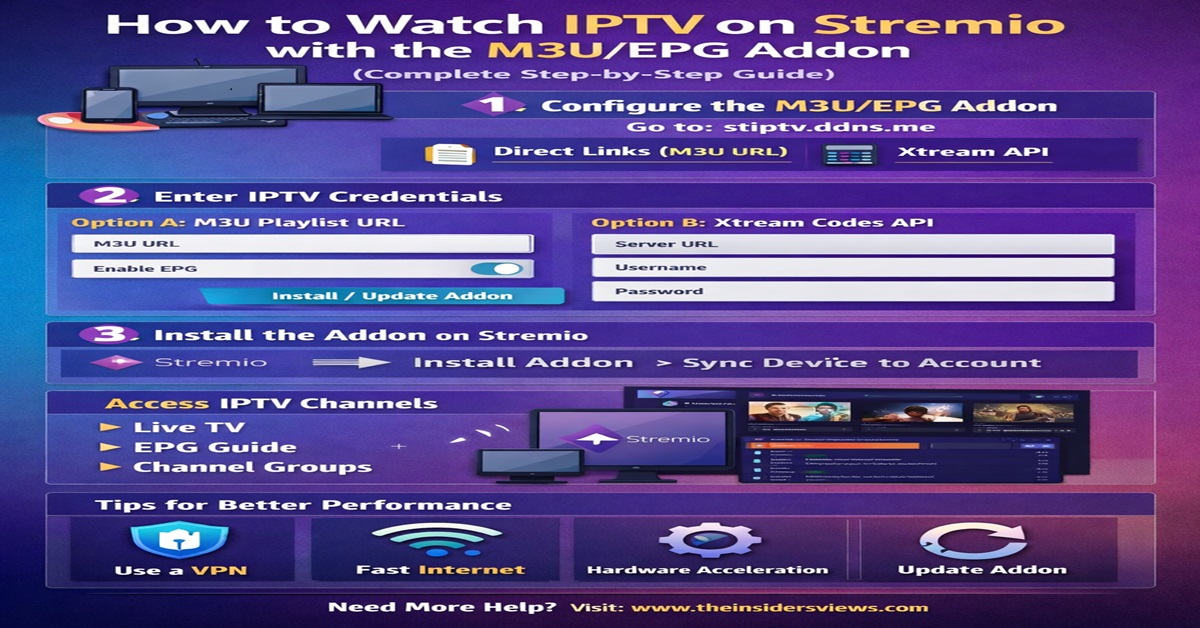
Step 1: Configure the M3U/EPG Addon
The configuration process is completed through a web browser before syncing with your streaming device.
- Open your browser on a PC, laptop, or mobile device
- Visit the official M3U/EPG Addon website
- Choose your preferred authorization method:
- Direct M3U Playlist URL
- Xtream Codes API
Step 2: Enter IPTV Credentials
Depending on your IPTV provider, input one of the following:
Option A: M3U URL
- Paste your M3U playlist link
- Enable EPG support if available
- Confirm channel grouping preferences
Option B: Xtream Codes API
- Enter Server URL
- Input Username and Password
- Enable EPG synchronization
- Confirm connection settings
Once complete, select Install/Update Addon.
Step 3: Install the Addon on Stremio
After configuration:
- Stremio will prompt you to install the addon
- Confirm installation
- Log in to the same Stremio account on your streaming device
- Allow the addon to sync automatically
Your IPTV channels will now appear inside Stremio’s interface.
Accessing IPTV Channels in Stremio
Once installed, IPTV channels are accessible from:
- Discover section
- Live TV categories
- Channel-specific groups
- EPG-based scheduling view
The integrated Electronic Program Guide (EPG) allows you to:
- View current and upcoming programs
- Navigate channels by category
- Track live broadcasts effortlessly
Optimizing IPTV Performance on Stremio
To ensure the best possible experience, apply the following optimizations:
- Use a stable high-speed internet connection
- Prefer wired Ethernet over Wi-Fi when possible
- Select hardware-accelerated decoding in Stremio settings
- Close unused background apps
- Regularly update the M3U/EPG Addon
These steps significantly improve playback stability and reduce buffering.
Common IPTV Issues and Fixes
Channels Not Loading
- Verify M3U or Xtream credentials
- Refresh the addon configuration
- Restart Stremio
EPG Not Showing
- Confirm EPG is enabled
- Check provider EPG availability
- Reinstall the addon
Buffering or Lag
- Switch to a lower stream quality
- Use a faster DNS
- Check IPTV provider server health
Is IPTV on Stremio Safe and Reliable?
Stremio itself is a legitimate media platform. IPTV reliability depends on the quality of your provider. For privacy-conscious users, pairing IPTV streaming with a secure VPN helps protect data and avoid ISP throttling.
Advantages of IPTV Over Traditional Cable
- Lower monthly cost
- No hardware contracts
- Global channel access
- On-demand flexibility
- Multi-device compatibility
When combined with Stremio, IPTV becomes a modern, efficient alternative to outdated cable services.
Why Stremio Is an Ideal IPTV Platform
Stremio stands out because it offers:
- Unified content management
- Cross-device synchronization
- Minimal resource usage
- Addon-based customization
- Metadata-rich user interface
With IPTV integrated, Stremio transforms into a complete all-in-one streaming ecosystem.
Final Thoughts
Using the M3U/EPG Addon, Stremio evolves beyond a video-on-demand app into a full-featured IPTV streaming powerhouse. With direct provider authorization, EPG integration, and seamless device syncing, this setup delivers unmatched flexibility and performance for live TV enthusiasts.
By following the steps outlined above, users can enjoy live television, premium channels, and real-time broadcasts inside one of the most elegant media platforms available today.